加载评论时出现问题。

How to manual restore database to cPanel using phpMyAdmin

支持门户  »  Knowledgebase  »  查看文章

  打印

How to create a MySQL database

  1. Log in to cPanel.
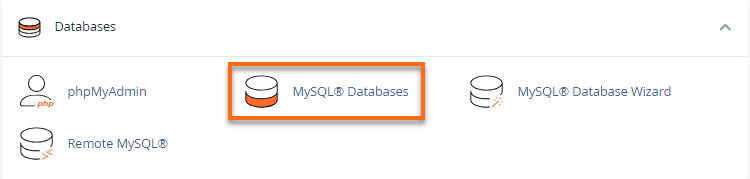
  2. Look for the Databases section, then click MySQL Databases

    cPanel MySQL Database icon

  3. In the New Database field, type a name for your database.
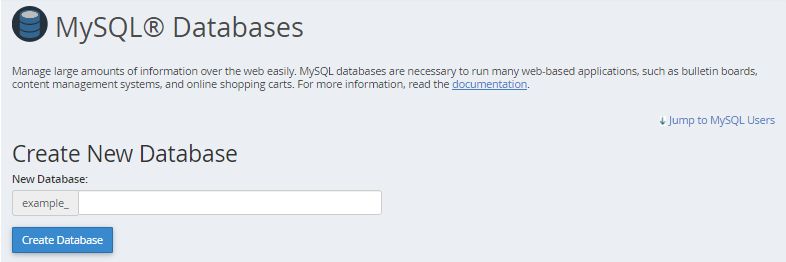
    Create New Database

  4. Click Create Database.
  5. Under Add User to Database, select a user from the User dropdown menu.  cdf682db28dce87013223e425303459eec44048c69ef0c1b4d5b6a9d4e941ccf39c187c452a053fd?t=cb2bacfb8eab68bf895f622e62ac9754
  6. From the Database dropdown menu, select the database you wish to allow the user access to.
  7. Click Add.
  8. Select the privileges you wish to grant the user or select ALL PRIVILEGES on the next page.

    829a47b71f8c3efaf3334dbba75658fc28db1757e5f7235efa6de67757e641c7a1e198c796ac5852?t=34260f52eeb03a0fb4e0d71afe167ca6

  9. Click Make Changes, then click Go Back.


How to Import or restore a database or table

  1. Log into phpMyAdmin through your cPanel dashboard
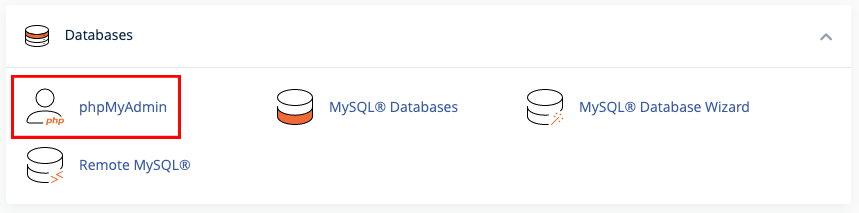
    phpMyAdmin.png
  2. Select the destination database on the left pane.3c84237647bf6426aa4c454cc589d480519b2e702229bd2f045db5ca21024948a21655f24b9399c2?t=83d14fc8178a61f97a540c58b90ed4f9
  3. Click on the Import tab in the top center pane.5ec9ac856dd146f22058a2f86f523e86613699267e83efd2b2e350d7e5a5da0e5711b4901ca02c0c?t=d17f2aa6d35da3f64bdcdc94d6d2bf8b
  4. Under the ‘File to import’ section, click Browse and locate the file with the .sql extension you wish to import.73ee54052ed4b2ff98649c47369f1b8ebbf74b92cc508c4e1df8d5ff458e16da7571c2208799645d?t=8581373206481bada7c168302d1dc661
  5. Click the Go button at the bottom to import the database.694258d80a61858786f354657e86f99e6152b050b24edb20ad601c5032ad5ef1049a9ceeb697fec3?t=be91e30e98eb0e0854e46d4ffe3c149a

*If you imported a database, all tables will show when selecting the database in the left panel of phpMyAdmin.

*If you imported a table, the newly-imported table will appear in the list of tables.


How to edit HTML wp-config.php database name

  1. Log into File Manager through your cPanel dashboarddc80d6e51c97a7169637fca6a0686aff89d6ab50e6480a1bb7745faf38f05f6c3d60d039ebb44e63?t=d15f2a58bd0cf7e70117b9b0b00afbbf
  2. public_html > wp-config.php right click edit
    16c1c5a14bd064bc820ff1558d751df03fd391719c3792a473d77e3aa6d578ac818f96a450e12db0?t=4a3c00b2a8f40822d2fb81d7d2e8d8c3
  3. change the DB_NAME to new database name after edit the database name click to Save Changes.bc80a2870c7a64f5613ba97d3c7b06609af8b7a2c1c76842bad3ed9f86ec7ed4ac839e17854aae26?t=291526cb2b97509b72b643c03607a149


通过分享

相关文章

Copyright © 2026 TheGigabit. All right reserved. Reg.No: 200701034297 (792326-P)